At a glance
- A suggested review order in the Files column: a “Start here” file, steps, and a time estimate.
- Pull Requests prepared in the background when your review is requested, read-only and with no AI.
- “New iteration” tells you how many files you’d already reviewed have changed since your pass.
- A SQLite local cache: on synthetic test data, writes are about three times faster and reopening drops from 84 ms to 0.8 ms.
- Everything stays on your machine; pre-analysis and risk learning can be turned off in Settings.
A suggested review order
Picture a Pull Request in Contoso’s ATLAS project: 40 changed files, a new type, three services that use it, tests. Until now, the list came in folder order.
Now the Files column offers a suggested review order:
- a “Start here” file: the most central of the changed files, based on the dependencies between the symbols they touch;
- steps (usually 2 to 5) that group files by folder or component, with types and interfaces before the code that uses them;
- a time estimate per step (“~6 min”), based on the size of the diff and nothing more;
- a “Pure refactor” badge when a file is only a rename or a move with identical content, labeled “to confirm”;
- a “Possible secret” badge when an added line looks like a key or a password: the tooltip shows the line number, never the value.
At the top, “32 of 40 files analyzed” tells you what the order is based on.
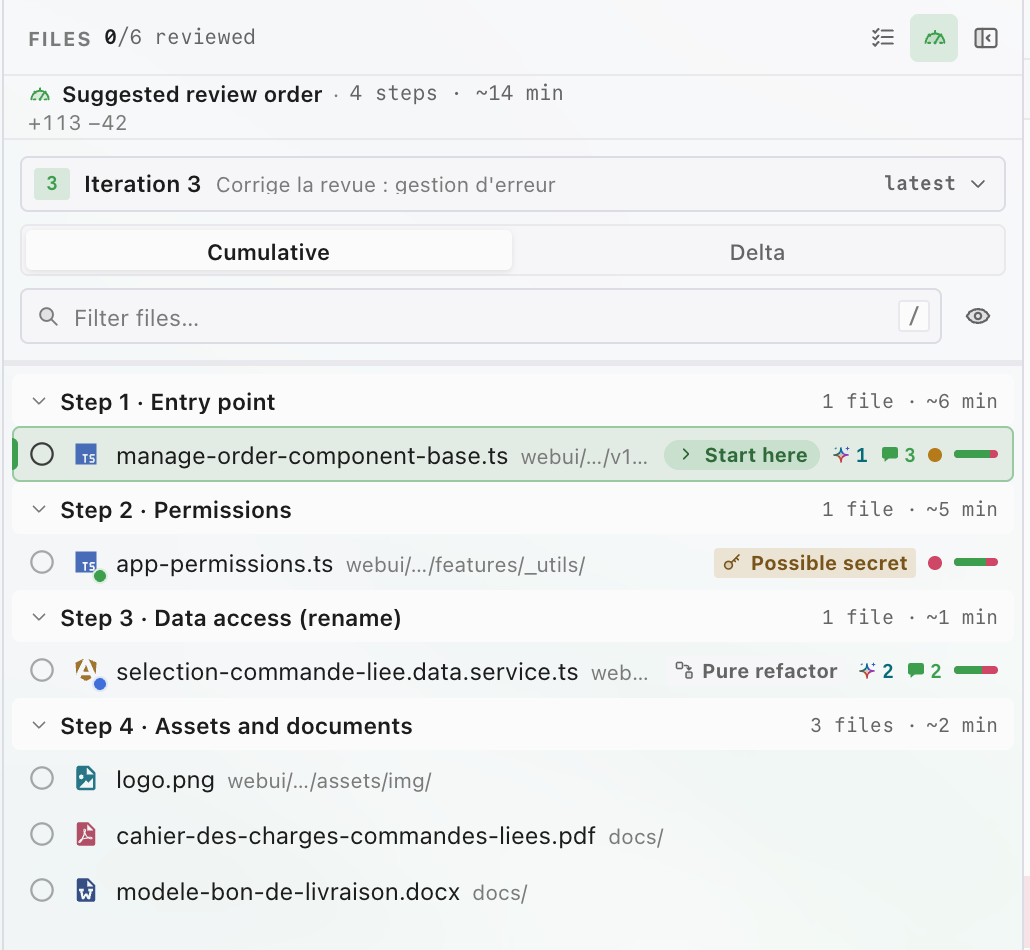
The Files column of a Contoso demo Pull Request, with the suggested review order.
An order that stays put
The suggested order locks the first time it appears. If a finer analysis arrives later (Diffwright starts from file paths, then reads file contents), it doesn’t replace anything on its own: a “A more precise order is available” banner offers “Apply”, and “Restore previous order” takes it back.
The ⌘K palette has “Next step” and “Previous step” commands.
Key takeaway
The suggested order is a signal, not a verdict: you’re still the reviewer, and nothing moves on screen without your click.
Pull Requests prepared ahead of time
Diffwright reads the Pull Requests that concern you in the background: the ones where you’re a requested reviewer, haven’t voted yet, and that aren’t drafts, up to 8 by default. When you open one, its files are already on disk and its review order is already computed.
A few rules:
- Read-only: nothing is written to Azure DevOps. No visit recorded, no vote, no comment.
- No AI: pre-analysis never calls an AI engine.
- Incremental: after a new push, only the files that changed are downloaded again.
- Bounded: a local disk cache capped at 500 MB by default (250 MB to 2 GB in Settings), paused on low battery, after a long time in the background, when offline, or when nearing the platform’s request limit.
- Background work on Azure DevOps only: on GitHub and GitLab, pre-analysis only runs when you open a Pull Request.
In the Pull Request list, a small gauge shows where each one stands: ready, in progress, paused. Pre-analysis is on by default and can be turned off in Settings.
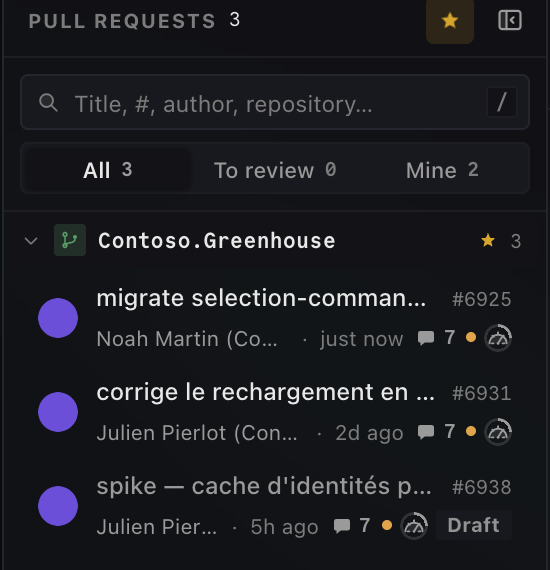
The pre-analysis gauge in the Pull Request list (here, pre-analysis in progress). Details appear on hover.
When a new iteration lands
Diffwright now keeps a local history of your review actions: files marked as reviewed, votes, and comments published from the app. When the author pushes a new version after your pass, the Pull Request shows “New iteration”, and the header tells you how many of the files you’d reviewed have changed since. One button switches to “Since my review” so you only reread the difference.
One limit to know about: only actions taken in Diffwright count. A file marked as reviewed or a vote cast in the Azure DevOps portal isn’t part of that history.
Faster to reopen and easier to find
Under pre-analysis, the local cache moves from JSON files to a SQLite database on your disk. Here’s what that changes day to day:
- Added and removed line counts are kept: a Pull Request you’ve already seen shows all its +/− bars on first render, with no fade-in and no new download.
- Search in comments: search (⌘K) has a new “Comments” group that finds a discussion in Pull Requests you’ve already opened. The “by: me” filter narrows results to your own comments, for example:
by: me timeout
- “Who calls this?” in milliseconds: the Impact tab can rely on an index of the repository’s symbols. It’s only built when you click “Analyze impact”, never in the background, and the result stays the same as with the existing analysis.
- Local risk learning: from your own reviews, Diffwright can raise a file’s risk level by one notch, never lower it. It only kicks in after 200 files and 20 Pull Requests reviewed and stays a signal, never a verdict. It’s on by default and can be turned off in Settings.
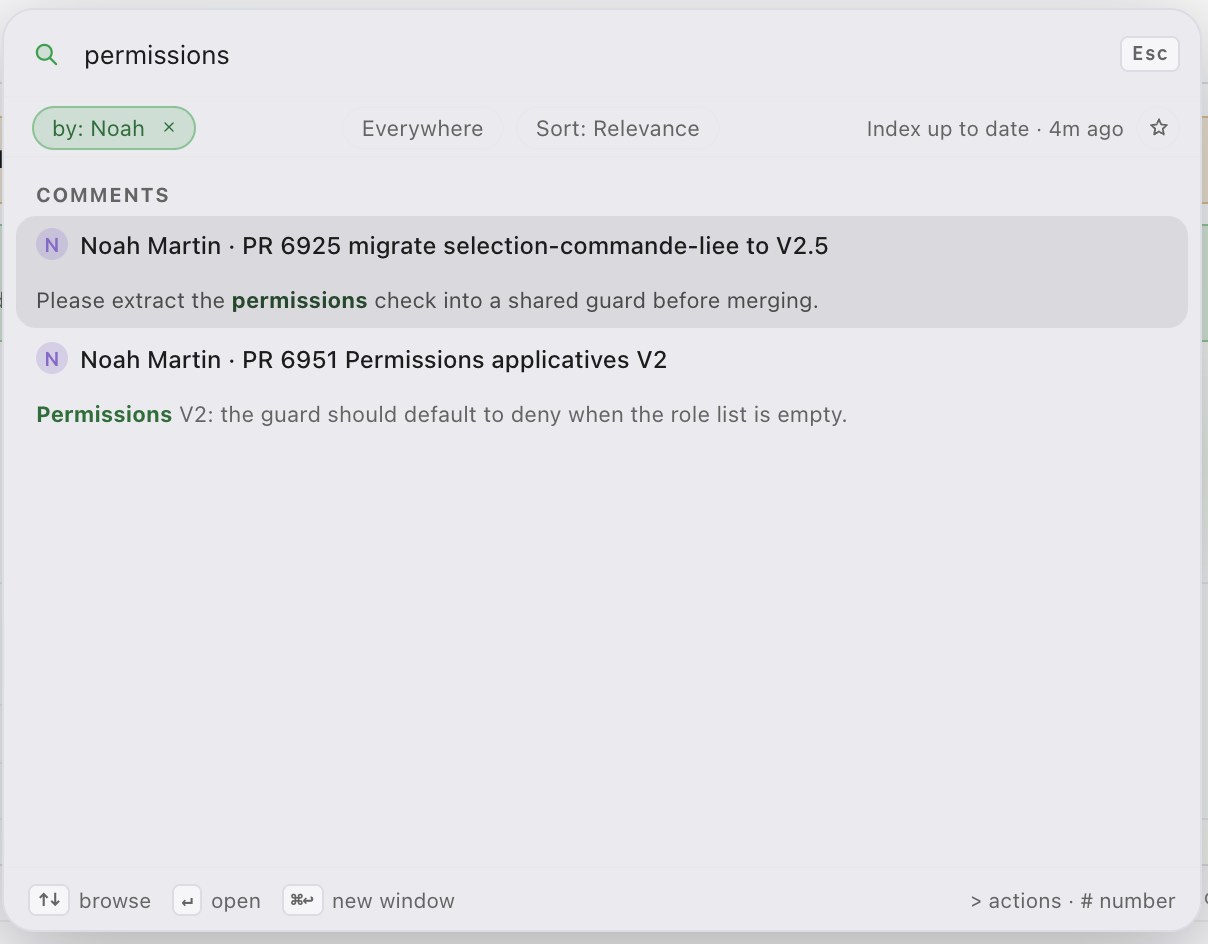
The “Comments” group in search, here filtered on an author. The “by: me” chip limits the search to your own comments.
Before and now
| Step | Before | Now |
|---|---|---|
| Open a 40-file Pull Request | Every file is downloaded on open | Files are already on disk if the Pull Request was prepared |
| Decide where to start | List in folder order | Suggested order, a “Start here” file, estimated steps |
| Reopen a Pull Request you’ve seen | +/− bars reload, with a fade-in | All bars on first render |
| Come back after a new push | Nothing shows which reviewed files changed | “New iteration” and the “Since my review” mode |
| Find a past discussion | Go through Pull Requests one by one | “Comments” group in ⌘K, “by: me” filter |
| See who calls a symbol | Existing impact analysis | Same result, through a symbol index built on demand |
Performance
The figures below come from automated benchmarks, built in release mode on a development machine, using synthetic test data: no real Pull Requests are involved. The times you see will vary with your disk, the Azure DevOps network, and the size of your Pull Requests.
File cache
Test data: 50,000 blobs of 2 KiB.
| Measurement | Before (JSON) | After (SQLite) | Gain |
|---|---|---|---|
| Writing all 50,000 blobs | 15.1 s | 4.7 to 5.0 s | ~3× |
| Reading one blob (p99) | 0.13 ms | 0.009 to 0.038 ms | ~3 to 14× |
| Evicting half the cache | 1.35 s | 0.73 to 0.88 s | ~1.5 to 1.8× |
| Reopening plus first read | 84 ms, with a folder scan | 0.8 ms, no scan | ~100× |
| Data written | ~6 MB JSON index rewritten every 32 blobs | ~10 KB per write | The index is no longer rewritten in full |
Persistent +/− line counts
Test data: 300,000 entries.
| Measurement | Before | After | Gain |
|---|---|---|---|
| Reading 500 known diffs (p99) | — | 0.52 ms | New |
| Evicting 5,000 entries | — | 13 ms | New |
Symbol index
Test data: 10,000 small files, for the “Who calls this?” impact analysis.
| Measurement | Before | After | Gain |
|---|---|---|---|
| Indexing (9.2 MB database) | — | 215 to 300 ms | New |
| Querying a batch of symbols (p50 / p99) | — | 0.09 ms / 0.27 ms | New |
| A symbol present in all 10,000 files | — | 3.9 ms | New |
The result is identical to the existing analysis, and a test checks it.
Review plan
| Measurement | Before | After | Gain |
|---|---|---|---|
| Full plan for a 300-file Pull Request | — | Under one second in tests | New |
| Rough plan, from file paths alone | — | Instant | New |
Most of these gains come from storage: the old cache rewrote a whole JSON index, while the new one only writes what changes in an indexed SQLite database, with no folder scan on reopen. Prefetching does the rest: a Pull Request that’s already been prepared opens without waiting for its files to download.
Key takeaway
These measurements describe Diffwright’s local work, not Azure DevOps speed.
Everything stays on your machine
None of this leaves your computer. The cache, your review history, the comment and symbol indexes, and the risk learning all live in ~/.diffwright, a folder private to your user account. Nothing is sent anywhere, and this release adds no usage statistics.
Privacy
Cached code and comments are stored unencrypted in
~/.diffwright. You stay in control:
- “Clear pre-analysis cache” frees up the disk space;
- “Delete learning…” erases what the app has learned from your reviews;
- “Delete local history…” erases, among other things, your review history.
Under the hood
The heavy lifting (downloads, dependency analysis, the order itself) happens in the background, away from the interface, so navigation stays instant. Every change goes through a review against the product’s invariants (no write without a click, repository data treated as untrusted) and a dedicated macOS and Windows review. The automated test suite is close to 3,000 tests.
What still needs verifying
Not verified yet
Diffwright is in beta, and this release more than most:
- The review order, the risk thresholds and the learning haven’t been calibrated on real organizations yet. They’re sensible heuristics, not proven values.
- The performance figures come from synthetic test data, not real Pull Requests.
- Several network behaviors still need checking against a real Azure DevOps organization: the API responses pre-analysis relies on, and how request limits are respected.
- All runtime behavior on Windows still needs checking on a real machine.
- On macOS, the “Metered network” pause doesn’t trigger yet.
- “New iteration” only knows about actions taken in Diffwright, not in the portal.
- Comment search doesn’t cover GitHub or GitLab yet.
- ⇧J / ⇧K shortcuts to jump between steps aren’t built: use ⌘K instead.
Try the beta
If you review Azure DevOps Pull Requests every day, one question matters more than the others: does the suggested order save you time or get in your way? The update will arrive through the app’s usual update prompt, and releases are published at https://github.com/Jpi-net/diffwright-releases/releases.
Feel free to report anything that gets in the way: real-world feedback calibrates what no test data can measure. Share your feedback through the contact form on the website, https://diffwright.app/en/contact, or by email at contact@diffwright.app.